

Open source · for Kubernetes
Non-prod environments that sleep when nobody’s using them, and wake when someone does.
Pauses idle Kubernetes workloads in staging, preview and dev, and wakes them on the first request.
It never deletes a workload or its data.
Free and open source under Apache 2.0.
What Napwake does with one environment
kubectl napwake status shows yours.01 Before you install
One command, and a report you can send your team.
A team that works 10 hours a day, five days a week, uses staging 50 of 168 hours. The other 70%, it’s idle. kubectl napwake scan shows your cluster’s own number before you install anything.
kubectl napwake scan
staging (EKS us-east-1): 31 workloads in 11 namespaces
Node autoscaler: Karpenter (consolidates when underutilized after 1m)
History: the last 7 days, from monitoring/prometheus-operated
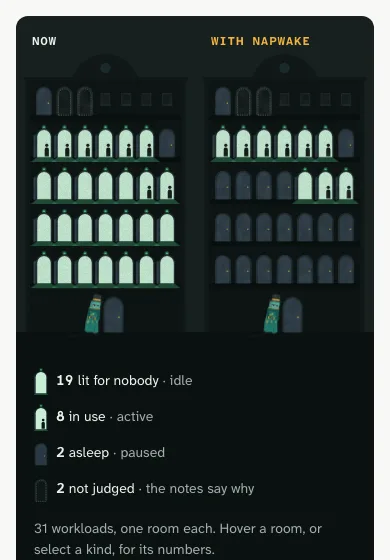
19 workloads are idle right now, reserving 28.5 vCPU and 77.5 GiB of memory.
They cost $871/month while running, $1.19 an hour: each hour asleep frees that.
Replaying the last 7 days, Napwake would have paused 24 of 26 unmanaged workloads for 2,796 hours in all,
and freed $159: about $691/month.
…
Report: /tmp/napwake-scan-2803149716.html (opened in your browser; --open=false to skip)$ kubectl napwake scan
 Open the example report
 - Read-only. It runs with your kubeconfig, and installs nothing in the cluster.
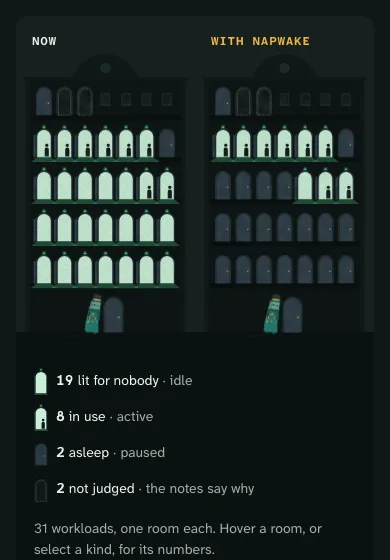
- Lit for nobody: your cluster as a hotel at night, with what’s idle right now lit up, and what it costs while it runs, at your nodes’ list prices.
- With Napwake: the lights go off in the rooms nobody’s using, and the last week, replayed from Prometheus, says what pausing would have freed.
Send it to your team: it’s one self-contained file, with nothing loaded from elsewhere, and it prints cleanly to PDF. Open the example report in a new tab
02 Four doors
Every workload is a door.
Shut is asleep, ajar is waking up, open is awake. A note on the door means it needs you. The plain word first, then the one kubectl napwake status prints.
- Asleep· paused
Scaled to zero. The Deployment or StatefulSet stays, and so do its Services, its PVCs and their data. Only the pods are removed. Its Services now point at the doorman.
- Waking up· resuming
A request, an activity annotation or the forecast woke it. Its replicas are being restored, and requests wait at the door until a pod is Ready.
- Awake· running
Running as usual, with nothing in front of it. Its activity clock runs. After
idleAfterwith no sign of use, an hour by default, it’s paused again. - Needs you· needs attention
A note pinned on the door. Something stops Napwake doing its job, and
kubectl napwake statussays what to fix.
03 How a wake works
Private doors open on a request.
Public ones can ask first.
Behind a VPN, single sign-on or an allowlist, the first request wakes a paused workload. On a public URL, most requests are robots. Set napwake.dev/wake: ask there, and the doorman asks first. Either way, the app and its Ingress don’t change.
Behind your VPN or SSO
The first request wakes it.
- 01 · Waking up
Someone opens staging. The doorman holds the first request, and wakes it.
- 02 · Waking up
Their browser gets the waking page at once. It reloads every 3 seconds.
- 03 · Awake
A pod is Ready, and the page opens the app.
On a public URL
With napwake.dev/wake: ask, a person wakes it.
- 01 · Asleep
Someone opens the preview. The doorman asks first. Their browser gets the asleep page, and nothing wakes.
- 02 · Waking up
They press Wake it. That wakes it, and the waking page carries on.
- 03 · Awake
A pod is Ready, and the page opens the app.
| Everyone else | Behind your VPN or SSO | On a public URL, set to ask |
|---|---|---|
| Scripts, API clients and database drivers | Held until a pod is Ready, for up to wake.maxWait, 2 minutes by default. After that, the connection is closed and the wake goes on. | Turned away. Over HTTP, a 503 that says how to wake it. Nothing wakes. |
| Known probes, scrapers and uptime monitors | A 503 at both doors, or a 200 for Google’s load balancer. Nothing wakes. | |
Tooling, by an annotation or kubectl napwake wake | Wakes it, at both doors. | |
| The forecast, if you turn it on | Wakes it 15 minutes before people usually come, at both doors. | |
It needs a readiness probe that passes only once the app can serve, so the held request reaches an app that’s ready. Behind your VPN or SSO, an HTTPS health check can’t be read, and wakes it every time. Wake on request, in the docs, has the cases where a caller sees something else.
04 Who it’s for
For any environment that isn’t production.
For platform and infrastructure engineers who run staging, preview and dev environments on their own Kubernetes clusters.
What it won’t do
- Delete anything. Its one action is to pause, which scales a workload to zero. A StatefulSet whose PVCs would be deleted on scale-down is never paused.
- Guess who’s a person. On an environment anyone can reach, set it to ask. Then only a click on Wake it wakes it, and robots are turned away.
- Run to a timetable. It pauses on idleness, not at 8pm. A workload idle all afternoon is paused, and a request at midnight wakes it.
- Replace your autoscaler. While a workload runs, its HPA or KEDA decides how many replicas it needs. Napwake only decides whether it should run at all.
05 Start
Scan, then try one workload.
The Quickstart takes one workload from idle and costing money to paused while idle, measuring it in dry-run first so nothing pauses until you say so.
$ brew install napwake/tap/kubectl-napwake
$ kubectl napwake scan
Free and open source under Apache 2.0.